This floor heals itself
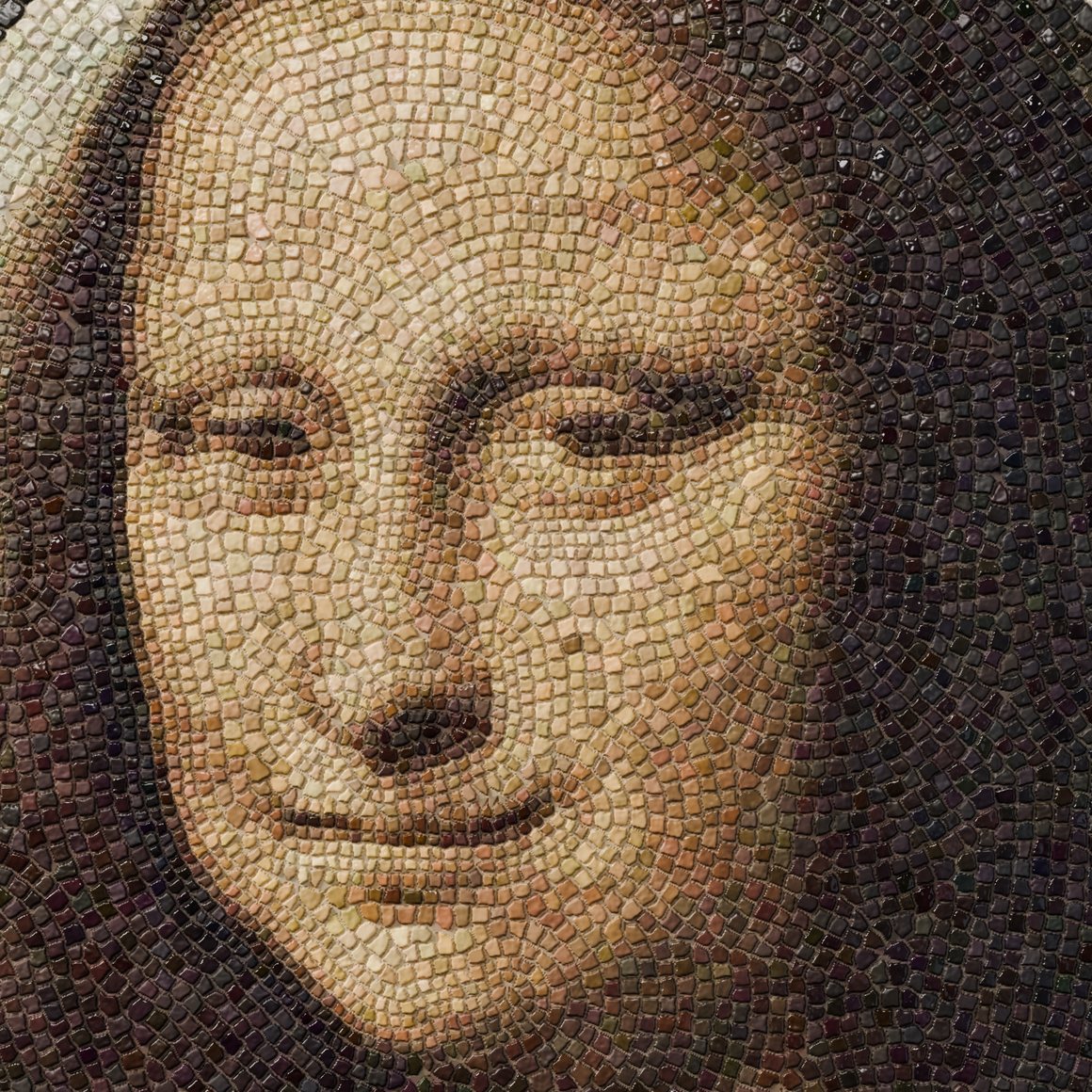
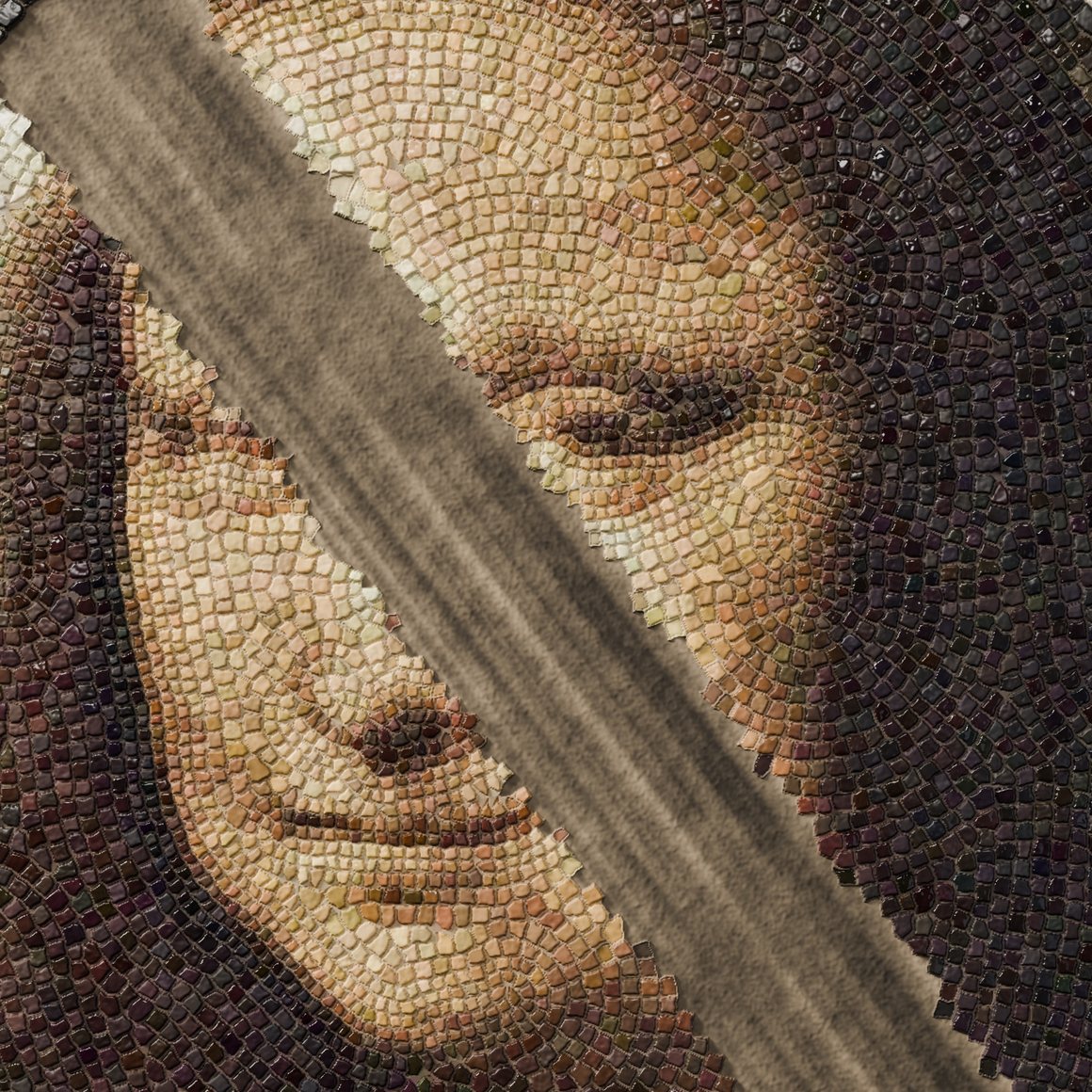
I taught a neural network to grow the Mona Lisa from a single cell, then rebuilt that network out of Pixel Processors in Substance Designer. It lays the portrait in 13,101 stones. Cut it and it regrows. Nobody animated the growing or the healing, and further down you can cut it yourself.
The floor
Every cell in this image is a tiny copy of the same neural network. A cell can see only its eight neighbours. There is no picture stored anywhere, no target and no timeline. Each cell looks around, works out what it should be, and changes a little. Run that for a few hundred steps from one living cell and a face assembles itself.
Below is the real thing, not a video. The same 16,512 weights that drive the film are running on your graphics card right now, one step per frame, with the same rules as the Designer graph. Drag across the face to cut it.
- Step
- 0
- Living cells
- 1
- Held open
- 0
One cell
This is a neural cellular automaton, the idea Mordvintsev, Randazzo, Niklasson and Levin published in 2020. A cell holds 32 numbers. The first four are colour and alpha. The other 28 are free: the network uses them however it likes, and training decides what they mean.
Each step a cell measures its surroundings: its own 32 values, plus how each one is changing left to right and top to bottom, using Sobel filters. That's 96 numbers. They go through 128 hidden units and come out as 32 small changes to the cell. That's the whole model, 16,512 weights, about the size of a small icon file. Pick a cell and watch those numbers.
Two rules hold the system together. A cell only updates if a coin flip says so, so cells can't lock into a global clock. And a cell with no neighbour above alpha 0.1 is dead: it's zeroed, every channel. The face is an agreement the cells keep reaching, one neighbour at a time.
The coin flip needs care. Designer has no random numbers that would match Python's, and for a proof I need them to match. So the flip is a small integer hash of x, y and step, using only values under 224. Those are exact in 32-bit floats, so the mask is bit-identical on CPU, on Metal, in Designer and in your browser.
h = (37x + 101y + 59k + 7) % 997h = (h² + 13k + 3x) % 997h = (89h + 7y) % 997fire = h < 498.5
Teaching it
Training looks like this: start from one cell, run a random number of steps, compare the picture to the target, and push the error back through every step. Then damage the result, put it in a pool, and start from it again later, so that the network learns to survive and not just to arrive. The first version took a 48×64 face. It read as the Mona Lisa, through a visible pixel grid, and a mosaic made from it was mush.
The second problem took longer to see. v3 had four times the cells, and its final picture was far better. But it only had a loss at the end, so nothing stopped it from looking bad on the way there. Growth split into 13 to 17 blobs, lopsided 4 to 1, and read as damage spreading. The heal ghosted a doubled brow.
For v4 I added losses during the rollout: a growth front that has to expand, and a hole that has to close from its edges, checked every 12 steps. Warm-started from v3, 8,000 iterations, 3.7 hours on the Mac.
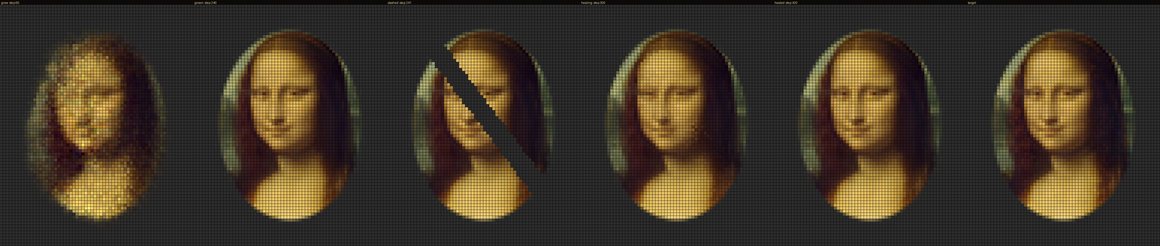
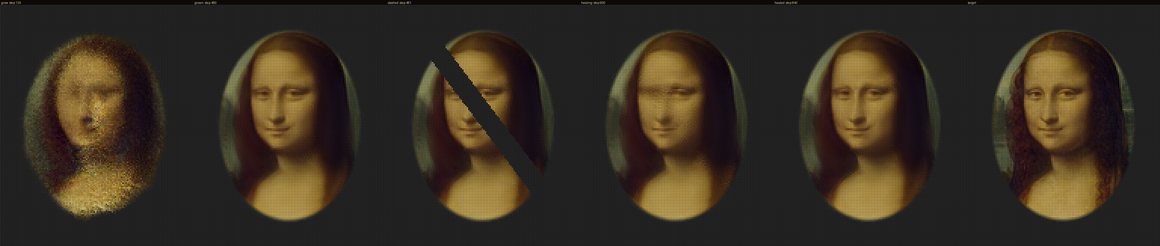
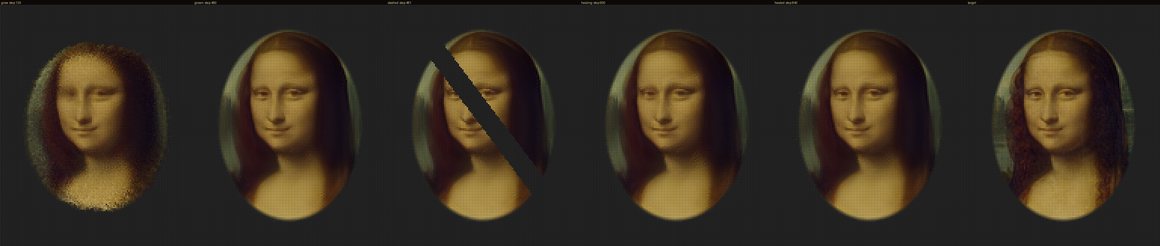
| Measure | v3 | v4 |
|---|---|---|
| Left/right balance, step 40 | 4.35 | 1.04 |
| RGB error, step 60 | 2.38 | 0.0137 |
| Heal band error, +80 steps | 0.0022 | 0.0009 |
| Heal band error, +200 steps | 0.0013 | 0.0007 |
| Separate blobs from step 60 | 8 to 17 | 3 to 6, main body over 99.8% |
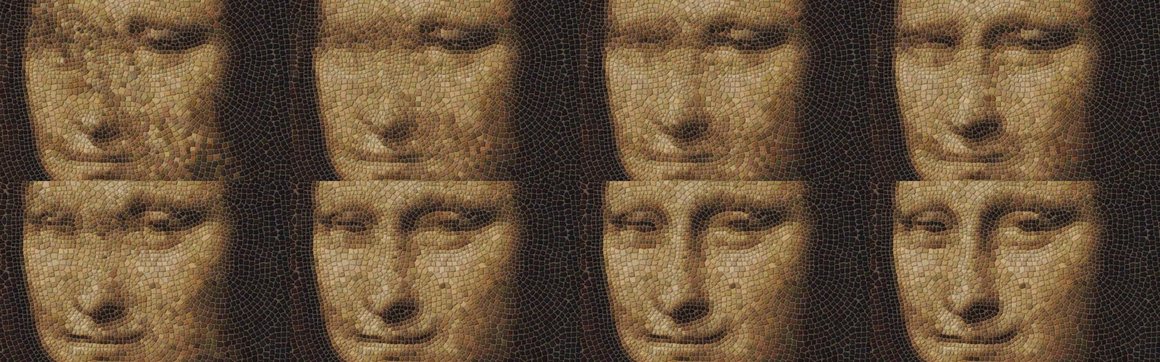
A network made of texture nodes
Python did the training. The film doesn't use Python to run the network. Designer does. It has no tensors, no matrix multiply and no memory between frames, so the network has to be spelled out in Pixel Processors.
The 32 channels of the whole grid are packed into one image, 8 RGBA texels per cell. Hidden units get their own image, 32 texels per cell. The weights are a 32×256 bitmap. One nca_step sub-graph holds two Pixel Processors: one forms all 128 hidden units with a while loop, the other turns them into the update and works out who lives. Hover the atlas to see what a texel means.
Rows 0 to 95: weights into the hidden layer.
Row 96: bias.
Rows 97 to 224: weights out to the 32 channels.
A 16-bit PNG came back from Designer as fp16, about 6e-4 off. Same picture, but the trajectory drifted 0.2 by step 60, which ruins any exact test. So every weight is two 8-bit textures, high byte and low byte, rebuilt in the graph. 8-bit reads are exact: 0 of 32,768 bytes wrong.
Nothing survives between frames in Designer, so nothing can be stored. Frame 900 of the network is seed, then 900 instances of nca_step, recomputed from scratch. An instance past the current frame just passes its input through. The final graph chains 1,504 of them.

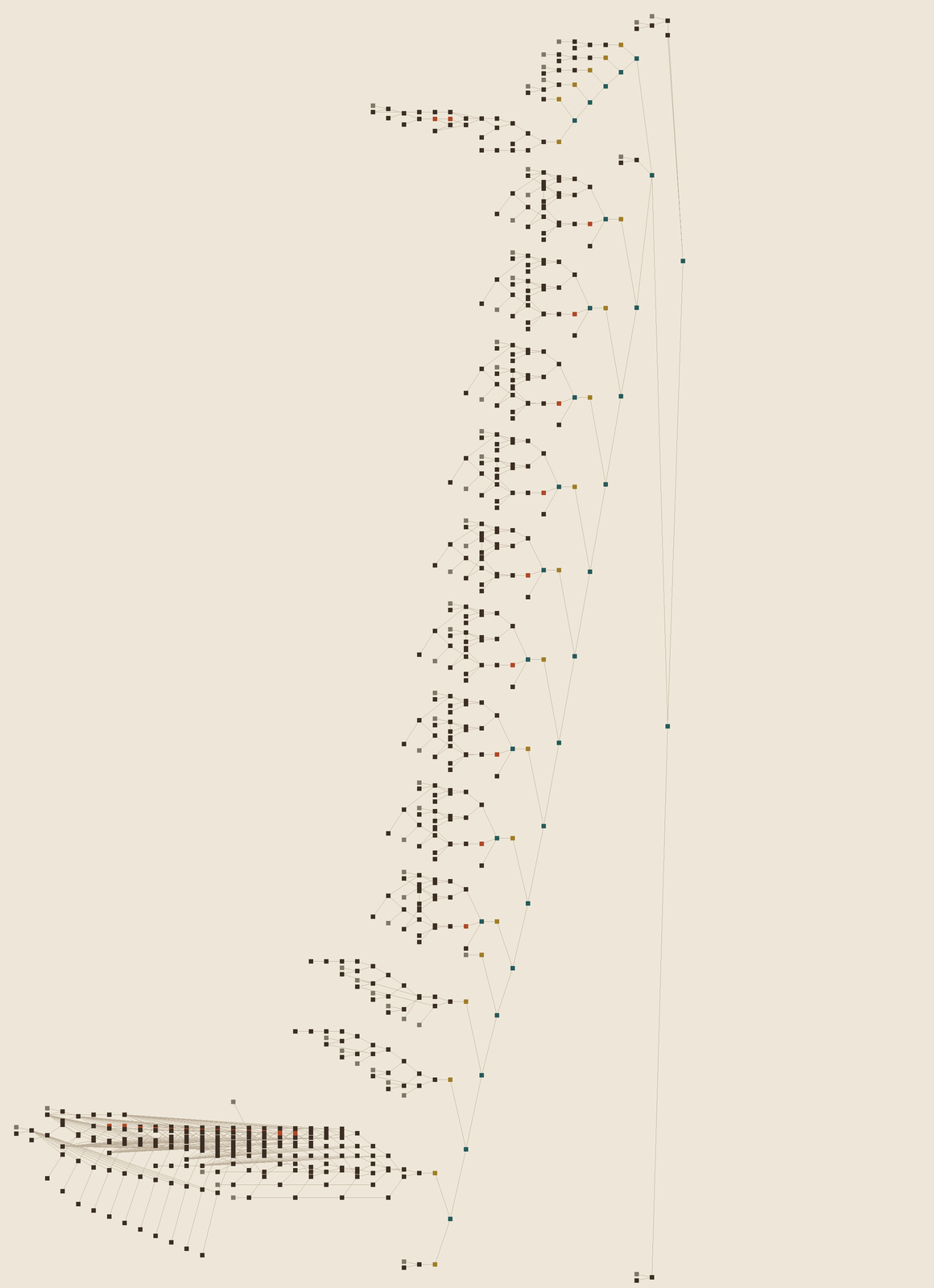
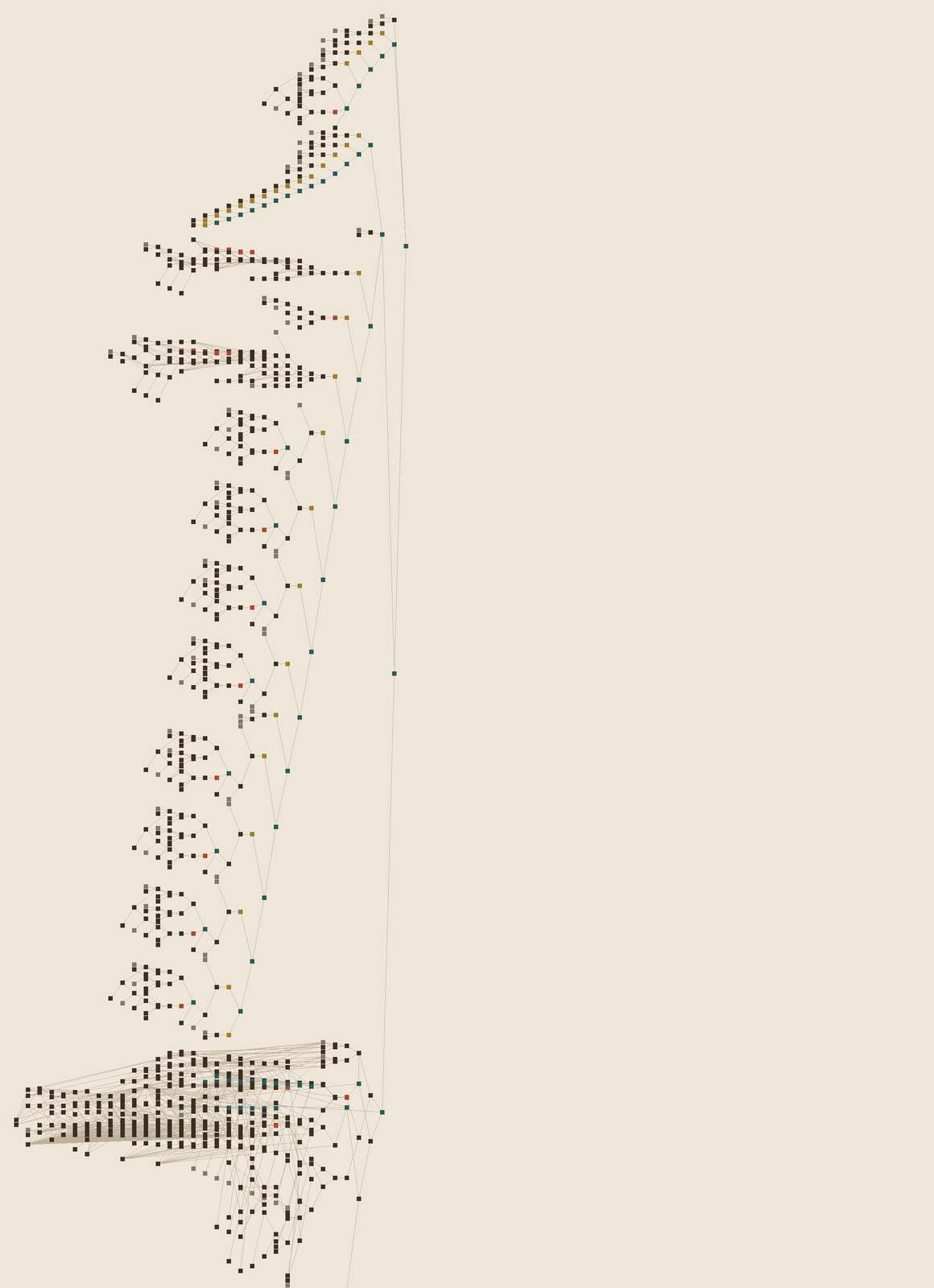
I expected memory to be the problem. On paper the intermediates come to about 17 GB. In practice sbsrender holds about 4 GB with the look pass in, and a frame of state takes 13 seconds on an M3 Max. Your browser does the same 1,504 steps in the time figure 5 reports below, because it can keep state from step to step and only runs the arithmetic it needs. Designer has to prove every frame from nothing, and that's what makes it interesting.
Proof
A network ported by hand is only worth anything if it's the same network. So every Designer render is diffed against lm_ref.py, a Python reference that steps the same weights by the same rules. Steps 1, 10 and 60 of the final network differ by at most 2.2e-5, with every living cell identical.
Here's a third machine: yours. This figure replays the film on your GPU from a single cell, then compares it against the state Designer rendered on my Mac, stored in this page.
It isn't perfectly clean, and I'd rather show that. The network is chaotic at its edges. Machines round 32-bit floats differently, and now and then one cell on the rim tips the other way. On the 840-step trial a patch on the left of the oval drifted: 18 cells had a colour off by more than 1/255, the worst by .018. On the final 1,504-step run Designer and Python agree on every living cell at every step I checked, with colour inside 3.5e-4. The hidden channels reach 2.1e-3 by the end. Your GPU rounds differently again, and by step 1,504 the gap has grown: on my Mac in Chrome, 4 of 9,608 cells disagree and 193 are off by more than 1/255, all from that same kind of tipping. The face is the same; the last few rim cells aren't. Designer against itself is exact: a repeat render comes back bit-identical, and that's the determinism the film needs.
Cutting stone
A network output is a colour grid. A mosaic isn't. My first pass put tiles on a lattice and it looked like a JPEG with grout. So I went to a real one, a 2nd century Roman floor with a portrait emblema in the Met's open collection, and copied how a setter thinks. Thin pale grout. Field stones in straight courses. Rows that hug the figure, which is called andamento. Finer stones in the face.
The rows in the face follow the image. I take the strongest edges of the healed portrait and lay stones along lines of equal distance from them, 3 fine rows along each feature. Brow, eye, nose and mouth all get rows that bend around them. That's 13,101 stones, placed once. They never move, so the animation is stones changing in place.
This part isn't pure Designer, and I want to be clear about it. The layout needs skeleton tracing, so Python computes it once and it enters the graph as bitmaps, along with static noise for veining and wear. Everything that changes per frame runs in the graph: sharpening, snapping to stone colours, losing stones, setting them back. It matches the Python look within 1/255 on every frame I diffed.
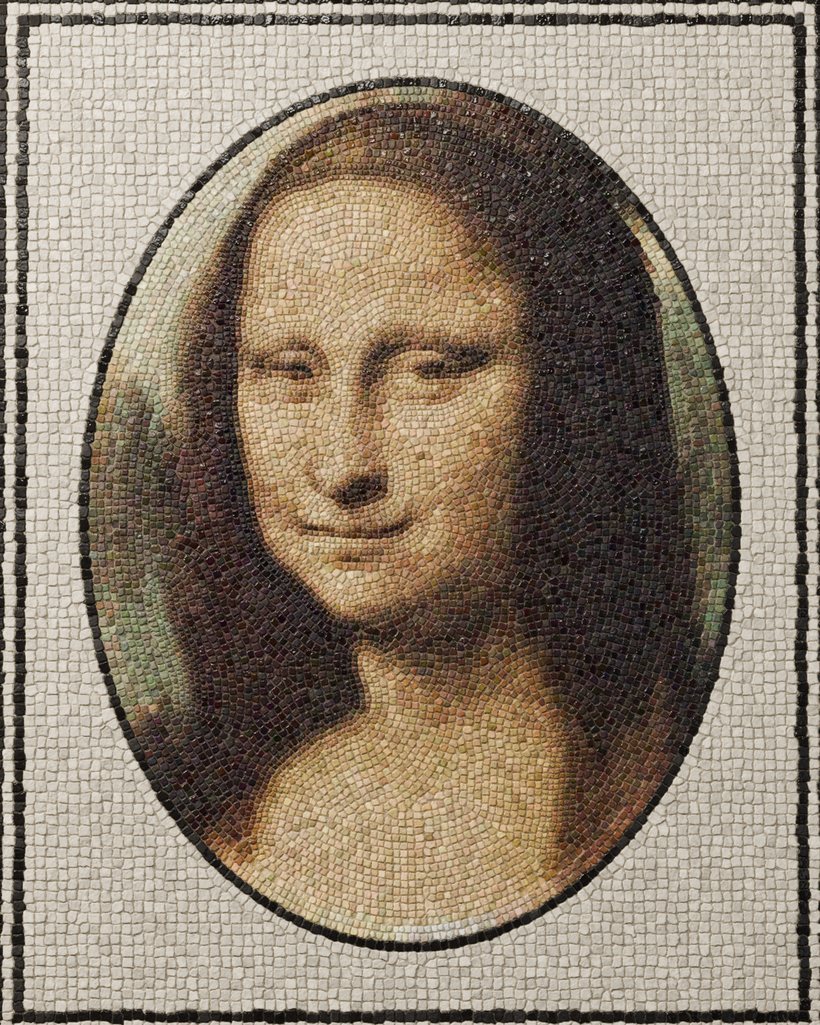
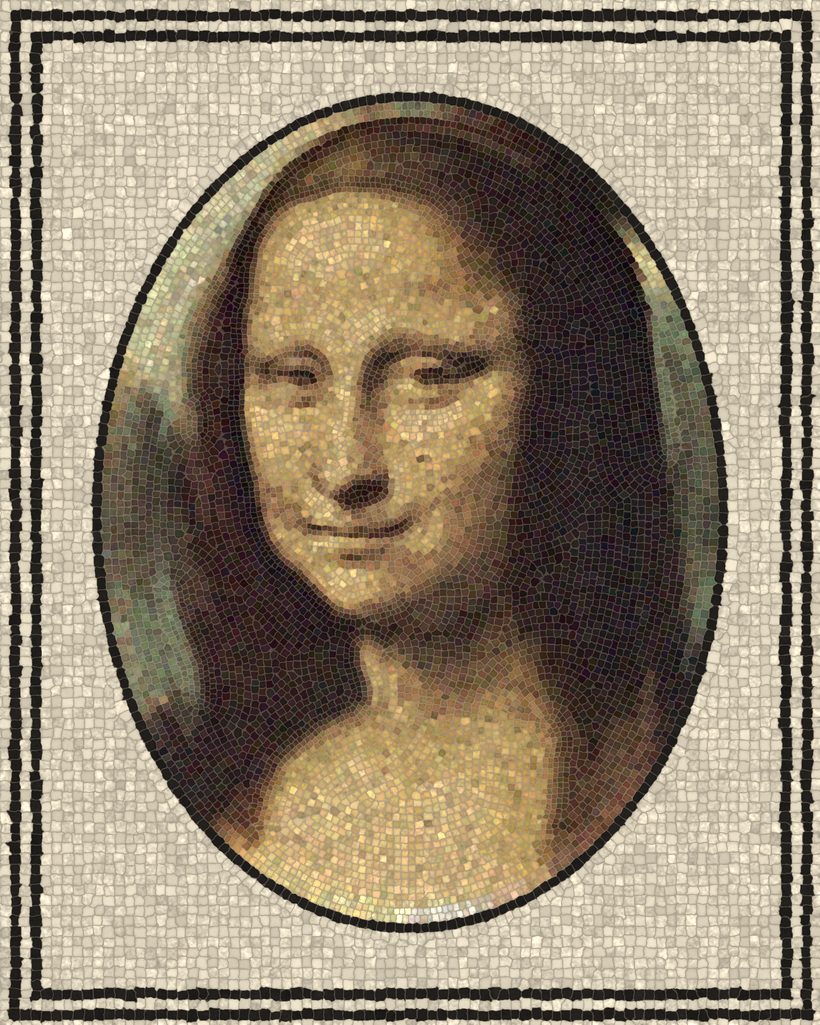
Each stone is one texel. The look pass reads the network at the stone's centre, sharpens it the way a mosaicist exaggerates a feature, and pulls it halfway toward one of 13 stone colours. When the network passes through a colour no stone comes in, the stone snaps fully. That's what ended the rainbow stones during growth. Every stone in the floor, in one 256×52 texture:
Getting it to look like stone took longer than getting the network into Designer. A list of what failed: tall domed stones read as cobbles, so the floor is ground nearly flat, the way Roman floors are. Dark grout looked wrong too, so the mortar is pale and only darkens under dark stones. Reds came back cyan until I found an 8-bit wraparound. The first bare patch still showed every stone's outline stamped in the bed. Creases read as worms. Smooth drag streaks read as wood grain. What's there now is broken chisel strokes along the wound.
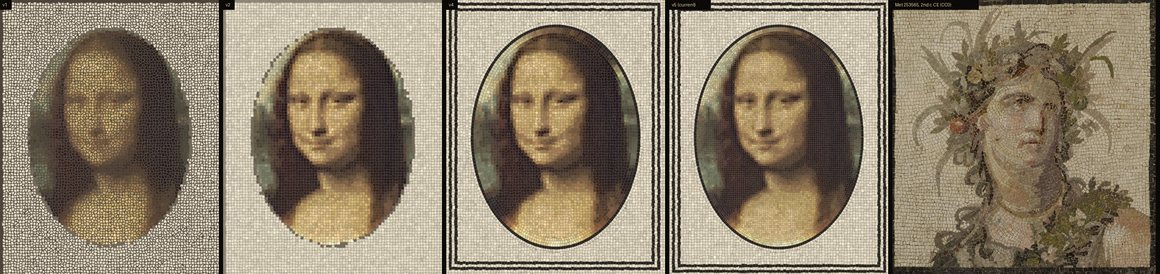
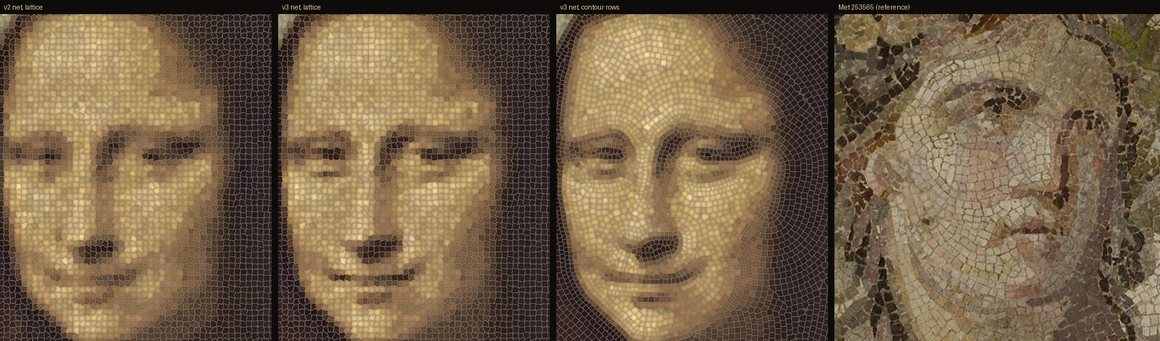
The frozen slash
The first full render went through and I caught something in the final frames. There's a shimmer in the floor, because the network never fully settles. Stones keep trading tiny amounts of colour. During the slash, that stopped.
The clip was cheating. To make the blade travel, I'd frozen the network at step 480 and wiped a mask across the frozen state. The hold on the finished cut was one frame repeated 24 times. The end hold was another. The floor was alive except at the moment it mattered most.
So the blade moved into the network. It's now a rule inside nca_step: the update pass clears cells behind a moving tip, on the step they're reached, while everything else carries on. There are no repeated frames in the film now. Shimmer on a patch of hair measures .00086 per frame before the cut and .00089 during it.
Then the network pushed back. A wound held open for 85 steps never quite healed. The cells beside it spent that time adapting to a hole, and the face came back with a permanent scar, at 2.5× the normal error. So the open wound lasts 12 frames, half a second, which is as long as the network tolerates.
| Blade sweep | Released at | End error | Bad cells | |
|---|---|---|---|---|
| 1 step | 482 | .00051 | 36 | Instant cut |
| 18 steps | 510 | .00052 | 36 | The film |
| 18 steps | 499 | .00058 | 87 | |
| 36 steps | 517 | .00059 | 89 | |
| 36 steps | 530 | .00079 | 160 | |
| 18 steps | 530 | .00092 | 201 | |
| 36 steps | 565 | .00136 | 422 | A permanent scar |
The second wound
One heal could be a trick. It had to take damage again. So I ran cheap tests: real weights, plain NumPy, raw colour, about a minute for nine effects. Each one scored by how close it came back. The rule the first round taught me was blunt: the network recovers from thin or small damage, and it can't rebuild a face from nothing. Big central loss never came back.
Round 2 tried S-curves with real brush shapes, impacts with debris, and an idea from real life: someone scrubbing with a pencil eraser. Wiping out the eyes of the most looked-at face in art was the first thing with meaning, not just damage. It also lost 3,215 cells and came back.
Then the stroke had to become a real gesture: one continuous zigzag, eraser never lifted, from the eyes to the bottom of the portrait. Every first attempt failed. A faster stroke was better, which told me the limit was time open, so I swept 24 settings of rows, width, speed and hold. A 1-second stroke healed. It was too fast to read. At 2 seconds I expected it to break, because 32 steps had been worse than 24. It didn't, but 4 rows couldn't stay open longer than 4 steps. With 3 rows the strips left between passes are wider, those strips are what the face regrows from, and each spot can stay bare for 12.
- Open now
- 0
- Touched so far
- 0
The stroke's timing is one baked number per cell: the step the eraser arrives. Dark is open now, tan has been released.
| Rows | Width | Steps | Hold | End error | Result |
|---|---|---|---|---|---|
| 4 | 3.5 | 48 | 4 | .00053 | Heals. Mostly one band visible at a time |
| 4 | 3.5 | 48 | 6 | .00114 | Doesn't reach .001 |
| 4 | 3.5 | 48 | 8 | .00310 | Damaged |
| 4 | 3.5 | 48 | 10 | .01451 | Damaged |
| 3 | 3.5 | 48 | 12 | .00053 | The film |
| 3 | 3.0 | 48 | 12 | .00052 | Heals faster, less visible |
It joined the film the honest way. The network just keeps running from the healed state. Half a second after step 1,032, the eraser lands. Step 1,032 in the longer graph is bit-identical to the approved clip, so there's no join to see, and in the exact stepping the face returns to .00052 by step 1,504. It's the same error as before the eraser.
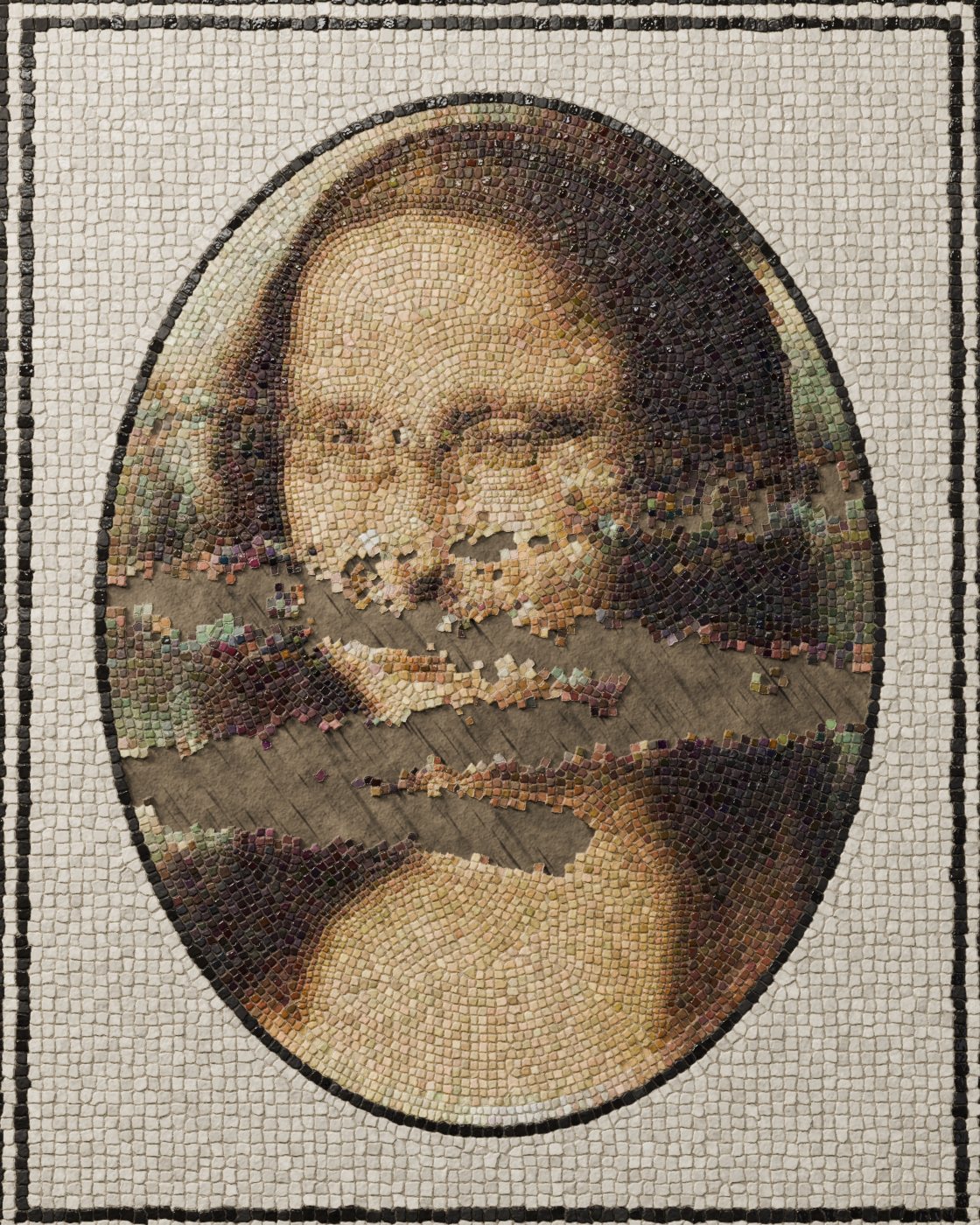
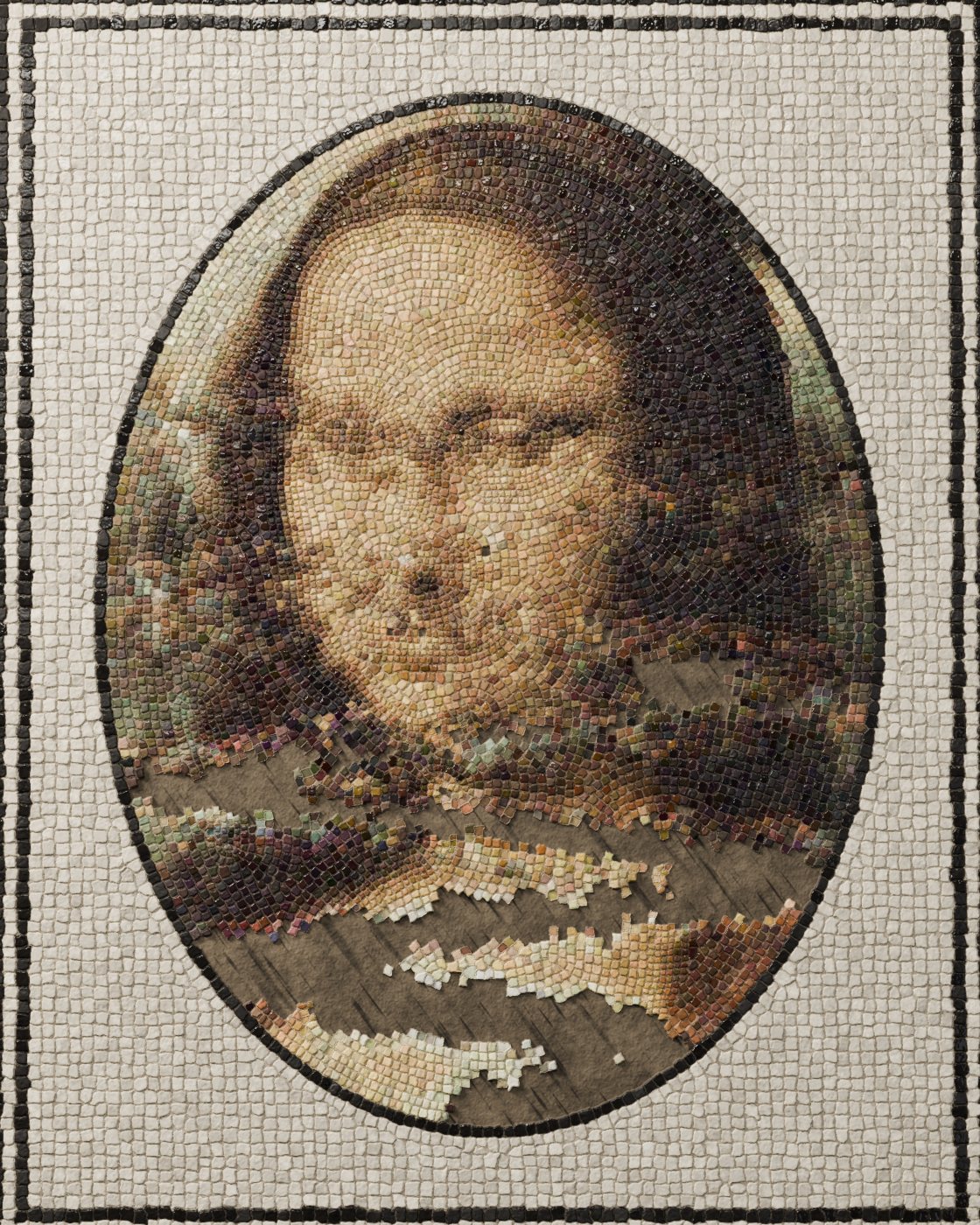
Light
Designer makes three maps for every frame: base colour, height and roughness. It doesn't draw the picture you see. Blender gets a displaced plane and three area lights: a warm key about 18 degrees above the floor, a cool fill, and a soft box placed in the camera's mirror angle so polished stones catch it and matte ones don't. Raking light is what turns height into stone.
Designer stays on my Mac, where the license is. The maps get copied to a Windows machine with an RTX 4090, and Cycles renders the frames there. Frames through step 480 were unaffected by the blade fix, so those stayed.
The Mac did have one last bad night. An early clip run used a shell throttle that counts 0 in zsh, so 162 render jobs started at once, the machine ran out of memory, and the kernel panicked. Since then, every heavy job has a tested worker limit and a memory guard.


Pull the key down and the floor goes flat. Pull the sheen down and polished stones stop reading as polished.


Numbers
nca_step instancesWhat's still wrong
The hair has no ringlets: the network smoothed them away in every version. The eye and mouth lines are harder than the painting. The left eye comes back a little more drawn than it started. One training seed of three settles worse than the others. The wound has no debris, because a network that only removes cells can't throw stones.
What's not pure Designer
The weights were trained in Python. The stone layout, the static noise and the eraser's timing map are baked inputs. Blender does the final light. The network itself, both wounds, and the per-frame look are Pixel Processors, 1,504 steps of them.